













Kudos has partnered with CardRatings and Red Ventures for our coverage of credit card products. Kudos, CardRatings, and Red Ventures may receive a commission from card issuers. Kudos may receive commission from card issuers. Some of the card offers that appear on Kudos are from advertisers and may impact how and where card products appear on the site. Kudos tries to include as many card companies and offers as we are aware of, including offers from issuers that don't pay us, but we may not cover all card companies or all available card offers. You don't have to use our links, but we're grateful when you do!

Is AppleCare+ Worth It in 2026? Complete Cost & Coverage Guide
September 27, 2026
.webp)



When you're checking out with a new iPhone, iPad, or Mac, Apple asks a simple question: "Would you like to add AppleCare+?" With prices ranging from $149 to $419 depending on your device, it's not a small decision — especially when you're already spending $800 to $3,000+ on the device itself.
Is AppleCare+ actually worth it, or are you paying for peace of mind you'll never use? We've run the numbers so you don't have to. Below is a full breakdown of costs, coverage, break-even math, and the hidden credit card benefits that could change your decision entirely.
What Is AppleCare+ and What Does It Cover?
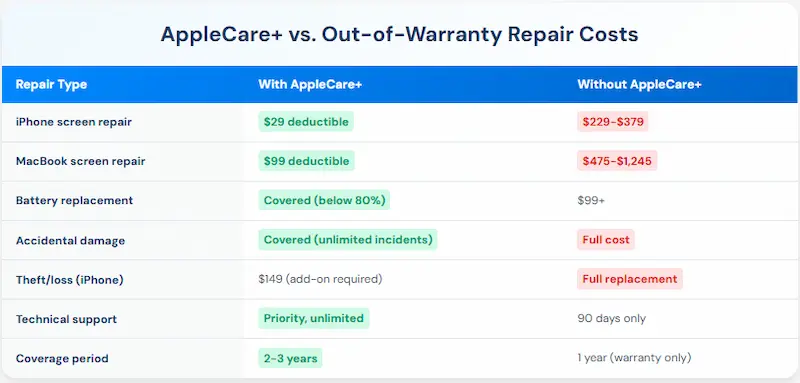
Every Apple product comes with a standard one-year limited warranty and 90 days of complimentary technical support. This basic warranty covers hardware failures and manufacturing defects — but not accidental damage.
AppleCare+ extends and enhances this coverage significantly.
Standard Apple Warranty: 1-year hardware coverage (2 years for Apple Watch Edition), 90 days of technical support, manufacturing defects only, and no accidental damage protection.
AppleCare+ Coverage: 2–3 years extended warranty (depending on device), unlimited accidental damage incidents (with service fees), battery service when capacity drops below 80%, priority access to Apple technical support, Express Replacement Service (ships a replacement before you return the damaged device), worldwide coverage, and the option to add theft and loss protection (iPhone only).
The key difference: AppleCare+ covers accidental damage — drops, spills, screen cracks — that the standard warranty won't touch.


How Much Does AppleCare+ Cost in 2026?
AppleCare+ pricing varies significantly based on which Apple product you're protecting. You can pay upfront for full coverage or choose monthly payments that can extend coverage indefinitely.
iPhone AppleCare+ Costs:
- iPhone 16, 15, 14: $149 (2 years) or $7.99/month
- iPhone 16 Plus, 15 Plus, 14 Plus: $169 (2 years) or $8.99/month
- iPhone 16 Pro, 15 Pro, 14 Pro: $199 (2 years) or $9.99/month
- iPhone 16 Pro Max, 15 Pro Max, 14 Pro Max: $269 (2 years) or $13.49/month
iPad AppleCare+ Costs:
- iPad, iPad mini: $69 (2 years) or $3.49/month
- iPad Air: $79 (2 years) or $3.99/month
- iPad Pro: $149 (2 years) or $7.49/month
Mac AppleCare+ Costs:
- MacBook Air: $249 (3 years) or $8.99/month
- MacBook Pro 13": $279 (3 years) or $9.99/month
- MacBook Pro 14"/16": $399–$419 (3 years) or $13.99/month
- iMac: $169–$259 (3 years)
- Mac Studio: $169 (3 years)
Other Devices:
- Apple Watch: $49–$99 (2 years) or $2.49–$4.99/month
- AirPods: $29–$59 (2 years)
- Apple TV: $29 (2 years)
- HomePod: $39 (2 years)
AppleCare+ with Theft and Loss (iPhone only): Add $70–$100 to the prices above for theft and loss coverage, available only in the United States and Japan.

Paying monthly costs roughly 20% more over a 2-year period. If you plan to keep your device for the full coverage term, paying upfront saves money. If you upgrade annually, monthly is the smarter choice — cancel when you trade in.
AppleCare+ Service Fees: What You'll Pay for Repairs
Here's what many people miss: even with AppleCare+, you still pay deductibles for accidental damage repairs. These service fees are dramatically lower than out-of-warranty costs, but they're not free.
iPhone Repair Deductibles:
- Screen or back glass damage: $29
- Other accidental damage: $99
- Theft or loss replacement: $149 (requires theft/loss coverage)
iPad Repair Deductibles:
- Screen damage: $29
- Accidental damage (iPad, mini): $49
- Accidental damage (Air, Pro): $99
Mac Repair Deductibles:
- Screen or enclosure damage: $99
- Other damage: $299
Other Devices:
- Apple Watch: $69–$79
- Apple Watch theft/loss: $119
- AirPods: $29
- Apple TV: $15
- HomePod: $15–$39
- Apple Vision Pro: $299
Without AppleCare+, repair costs are substantial:
- iPhone screen replacement: $229–$379
- iPhone full replacement: $449–$679
- iPad screen: $299–$799
- MacBook screen: $475–$1,245
- MacBook logic board: $500–$1,200+

The True Cost: Break-Even Analysis by Device
Let's calculate exactly when AppleCare+ pays for itself.
iPhone 16 Pro Example:
- AppleCare+ cost: $199 (2 years)
- One screen repair with AppleCare+: $29 deductible → Total cost: $228
- Out-of-warranty screen repair: $329
- Savings with AppleCare+: $101 on the first incident
- Break-even: 1 screen repair, immediately
MacBook Pro 14" Example:
- AppleCare+ cost: $399 (3 years)
- One screen repair with AppleCare+: $99 deductible → Total cost: $498
- Out-of-warranty screen repair: $679
- Savings with AppleCare+: $181 on the first incident
- Break-even: 1 screen repair, immediately saves money
iPad Air Example:
- AppleCare+ cost: $79 (2 years)
- One accidental damage repair: $99 deductible → Total cost: $178
- Out-of-warranty repair: $399
- Savings with AppleCare+: $221 on the first incident
- Break-even: Any single damage incident
The math is clear: AppleCare+ pays for itself with a single significant repair. The question is whether you'll have one.
Should You Apply? Who AppleCare+ Is (and Isn't) For
Yes, if you're a high-risk user:
- You've cracked 2+ screens in the past
- You work in physically demanding environments (construction, outdoors, with kids)
- You don't use cases or screen protectors
- You frequently travel or commute with devices
- Your device is a premium model (MacBook Pro 14"/16", iPhone Pro Max, iPad Pro)
- Calculate Your Risk: If there's a 30%+ chance you'll damage your device in 2 years, AppleCare+ is worth it
Skip it if:
- You've never damaged a device in 5+ years
- You always use protective cases and screen protectors
- Your device stays in one place (desktop Mac, home-only iPad)
- You have savings to cover a potential repair
- You upgrade devices every 1–2 years (before major issues occur)
- You bought a base model (iPad, Apple Watch SE) where repair costs are proportionally low
Who should avoid it entirely:
If your device cost × 0.15 is less than the AppleCare+ price, the math rarely works in your favor. Example: base iPad at $329 → $329 × 0.15 = $49.35, which is less than the $69 AppleCare+ cost for that device. For these buyers, a good case and careful habits are the better investment.
AppleCare+ vs. AppleCare One: Which Plan Is Right for You?
In July 2025, Apple introduced AppleCare One — a subscription plan that covers multiple devices under one monthly payment.
AppleCare One at a Glance:
- $19.99/month for 3 devices
- $5.99/month per additional device
- Covers devices up to 4 years old (if in good condition)
- Includes theft and loss for iPhone, iPad, and Apple Watch
- Add/remove devices anytime
- Available in the United States only
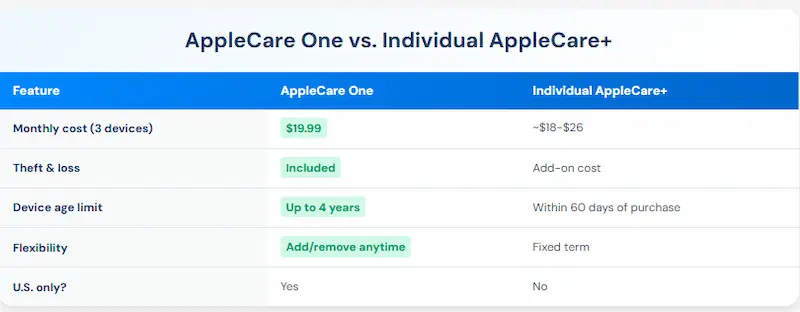
AppleCare One makes sense if: you own 3+ Apple devices, want theft/loss coverage across all of them, or have older devices (2–4 years old) you want to protect.
Stick with individual AppleCare+ if: you only need 1–2 devices covered, prefer paying upfront, or are outside the United States.

How to Buy AppleCare+ (and When You Can Add It)
You don't have to decide at checkout. Here's your timeline:
Purchase Windows:
- At checkout: Buy with device online, in-store, or via Apple Store app
- Within 60 days: Add via Settings app on iPhone, iPad, or Mac
- Up to 1 year: Macs and Apple TVs in select countries only
How to Add After Purchase — iPhone/iPad: Open Settings → tap your name → Find My → [Device Name] → tap "AppleCare+ Coverage Available" → follow prompts.
How to Add After Purchase — Mac: Apple menu → System Settings → General → About → "AppleCare+ Coverage Available" → follow prompts.
Important: Apple may run a remote diagnostic to verify your device is in good condition before approving coverage. Act within your 60-day window — don't let it lapse.
What AppleCare+ Doesn't Cover
Not covered:
- Cosmetic damage (scratches, dents) that doesn't affect functionality
- Loss or theft (unless you purchased the theft/loss add-on)
- Damage from reckless, abusive, willful, or intentional conduct
- Unauthorized modifications or repairs
- Normal wear and tear
- Damage from natural disasters or acts of God
Claim limits:
- Unlimited accidental damage incidents (with deductibles)
- 2 theft or loss claims per 12 months
- Battery service when capacity drops below 80%
Fine print: Find My must be enabled for theft/loss claims. Repairs must go through Apple or Apple Authorized Service Providers. Coverage is tied to the device serial number, not the owner — it transfers if you sell.
Hidden Benefit: Your Credit Card Might Already Cover Some of This
Here's what many Apple customers don't realize: premium credit cards often include purchase protection and extended warranty benefits that can supplement or even replace some AppleCare+ coverage — at no extra cost.
Purchase Protection (First 90–120 days): Many premium cards cover theft or damage to new purchases, typically up to $10,000 per claim. Cards with this benefit include the Chase Sapphire Reserve®, American Express Platinum Card® (See Rates & Fees), and the Capital One Venture X Rewards Credit Card.
[[ COMPARE_CARD * {"ids": ["510", "106", "2888"], "bestCategoryIds":["17", "18", "19"], "bestForTexts":["High-Value Perks", "Serious Points on Flights", "Luxurious Travel Benefits"]} ]]
American Express Platinum Card® (See Rates & Fees). Eligibility and Benefit level varies by Card. Terms, Conditions and Limitations Apply. Please visit americanexpress.com/benefitsguide for more details. Underwritten by Amex Assurance Company.
Extended Warranty (After Apple's 1-year warranty expires): Several cards automatically add 1 year to manufacturer warranties. Your iPhone gets 2 years of manufacturer defect coverage without paying for AppleCare+.
How to Stack Protection:
- Purchase your Apple device with a premium credit card for initial 90–120 day coverage
- Evaluate within 60 days whether to add AppleCare+
- Credit card extended warranty covers year 2 (after Apple's warranty lapses)
- AppleCare+ covers years 2–3 if purchased
This strategy gives you time to assess your actual usage habits before committing to AppleCare+.
Related: AmEx Cell Phone Protection vs. AppleCare+: Complete Guide 2026

Is AppleCare+ Worth It? The Final Verdict
AppleCare+ is worth it if:
- You have a track record of damaging devices (even 1 prior incident)
- You own a high-value device (MacBook Pro, iPhone Pro Max, iPad Pro)
- You can't absorb a $300–$800 surprise repair bill
- You want priority support and Express Replacement convenience
- You work in environments where damage is likely
- ROI turns positive with just 1 damage incident
You can skip AppleCare+ if:
- You've never damaged a device in 5+ years
- You always use protective cases and screen protectors
- Your device is low-value (base iPad, Apple TV)
- You have emergency savings for repairs
- You have credit card benefits covering purchase protection or extended warranty
- You upgrade annually (within standard warranty period)
- Potential savings: $149–$419 per device
The smart middle ground: Buy AppleCare+ for your primary device (iPhone), skip it for secondary devices (iPad for home use, Apple TV), and use credit card benefits for your initial protection window. Optimized cost: ~$149–$199 instead of $400+ for all devices.
Bottom Line
AppleCare+ isn't insurance — it's a calculated bet. You're paying $149–$419 upfront (or monthly) wagering that you'll need repairs that cost more without coverage. Apple wins if you never claim; you win if you have even one significant damage incident.
The math strongly favors AppleCare+ for expensive devices and high-risk users. A single MacBook screen repair ($679) or iPhone back glass replacement ($349–$549) means AppleCare+ pays for itself immediately. For careful users with budget devices, the money might be better kept in savings.
Quick Decision Formula:
- Device cost × 0.15 < AppleCare+ cost → Skip it
- Device cost × 0.15 > AppleCare+ cost → Buy it
Example: iPhone 16 Pro ($999) → $999 × 0.15 = $149.85. AppleCare+ costs $199. Close call — decide based on your personal damage history.
The best time to decide is right now, while you're within your 60-day window. Check your purchase date, run the math above, and make an informed choice based on your actual risk profile — not fear-based upsells at checkout.
Frequently Asked Questions
Can I buy AppleCare+ after 60 days?
For most devices, no. iPhones, iPads, and Apple Watches must have AppleCare+ added within 60 days of purchase. Macs and Apple TVs can add coverage up to 1 year after purchase in select countries. Adding coverage via the Settings app may require a remote diagnostic to verify your device is undamaged.
Does AppleCare+ cover water damage?
Yes. AppleCare+ covers all types of accidental damage, including liquid damage. You'll pay the standard service fee ($29 for screen damage, $99 for other iPhone damage), but the repair is covered. Without AppleCare+, water damage repairs run $349–$679 depending on your iPhone model.
What happens to AppleCare+ if I sell my device?
AppleCare+ transfers with the device to the new owner. Coverage is tied to the serial number, not the original purchaser. You cannot transfer AppleCare+ to a different device or receive a refund for unused time (except in jurisdictions with pro-rated refund laws).
Can I cancel AppleCare+ and get a refund?
Yes, with conditions. Cancel within 30 days with no claims filed and you get a full refund. After 30 days, Apple provides a pro-rated refund based on unused coverage, minus any service fees already used. Monthly plans can be cancelled anytime with no refund for prior months.
Does AppleCare+ cover lost AirPods?
No. AppleCare+ for AirPods covers accidental damage only — not loss or theft. There is no theft and loss option for AirPods. A replacement single AirPod Pro runs $69–$89; a charging case is $99.
Is monthly AppleCare+ better than paying upfront?
It depends on how long you keep your device. Monthly costs roughly 20% more over 2 years but offers flexibility. If you upgrade annually, monthly is smarter — cancel when you trade in. If you keep devices 3+ years, upfront saves money. Breakdown: iPhone 16 Pro monthly ($9.99 × 24 = $239.76) vs. upfront ($199) = $40.76 premium for flexibility.
Unlock your extra benefits when you become a Kudos member



Turn your online shopping into even more rewards


Join over 400,000 members simplifying their finances



Editorial Disclosure: Opinions expressed here are those of Kudos alone, not those of any bank, credit card issuer, hotel, airline, or other entity. This content has not been reviewed, approved or otherwise endorsed by any of the entities included within the post.


.webp)


.webp)