










Kudos has partnered with CardRatings and Red Ventures for our coverage of credit card products. Kudos, CardRatings, and Red Ventures may receive a commission from card issuers. Kudos may receive commission from card issuers. Some of the card offers that appear on Kudos are from advertisers and may impact how and where card products appear on the site. Kudos tries to include as many card companies and offers as we are aware of, including offers from issuers that don't pay us, but we may not cover all card companies or all available card offers. You don't have to use our links, but we're grateful when you do!

7 Best Tools and Tips to Manage Your Subscriptions in 2026 (and Avoid Subscription Creep)
September 27, 2026
.webp)



Drowning in subscription emails and surprise charges? You're not alone. The average American now spends $329 per month on subscriptions — and 42% of people are actively paying for at least one service they've completely forgotten about. Managing all your recurring expenses has become a chore in itself, but don't worry: there's an app (or seven) for that.
In this article, we'll cover the best subscription management tools of 2026 and the most effective tips to keep your recurring expenses under control. Say goodbye to forgotten renewals and hello to a streamlined — and cheaper — subscription life.

How Much Is Subscription Creep Actually Costing You in 2026?
Before jumping into the tools, it's worth understanding the scope of the problem. "Subscription creep" is the gradual accumulation of recurring charges that quietly drain your bank account month after month. It happens because signing up is frictionless and canceling is often deliberately difficult.
Here's what the numbers look like in 2026:
- The average American household pays for 12 subscription services simultaneously
- Monthly subscription spending has increased 35% since 2020, driven by the explosion of streaming, software, and wellness apps
- Rocket Money reports that its users discover an average of $80–$100/month in forgotten or unwanted subscriptions after their first account scan
- Annual subscriptions are the sneakiest culprits — a $99/year charge hits once, gets forgotten, and renews silently for years
The math is straightforward: if you're carrying just three forgotten subscriptions averaging $15/month each, that's $540/year leaving your account for services you're not using. The tools below can help you find and eliminate them in under an hour.
Good news on the regulatory front: A new FTC "Click to Cancel" rule took effect in 2025, requiring companies to provide a simple online cancellation method if you signed up online. This means the days of calling a 1-800 number to cancel a $10 streaming app are largely behind us — companies that don't comply face federal penalties.

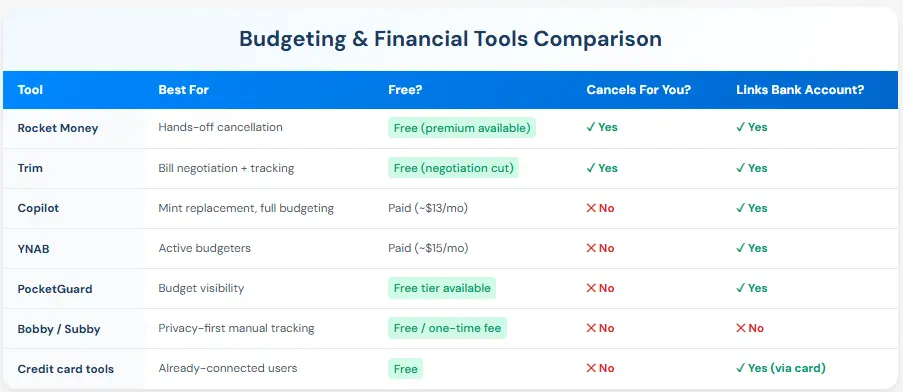
Quick Comparison: 7 Best Subscription Management Tools

Before canceling a subscription, check your Benefits Tracker first. Some cards include complimentary streaming or service credits that cover subscriptions you're already paying for out of pocket. You may not need to cancel at all.
1. Rocket Money (formerly Truebill) – Track & Cancel in One Tap
Best for: Hands-off cancellation · Free to start
Rocket Money is consistently the first app mentioned for subscription control, and for good reason. It automatically scans your bank and credit card transactions to find all your recurring subscriptions, then presents them in a clean dashboard so you can quickly see exactly what you're paying for each month.
Top features: Rocket Money can cancel subscriptions on your behalf — just tap "Cancel" next to that unused magazine subscription, and Rocket Money handles the entire cancellation process for you. It also notifies you of upcoming bills and can negotiate certain recurring bills (like cable or phone) for a share of the savings.
ROI reality check: If Rocket Money finds just $30/month in forgotten subscriptions (well below the $80–$100 average it typically surfaces), the free tier pays for itself immediately. The premium plan runs $6–$12/month and breaks even if it saves you just one forgotten subscription.
Why it's great: It directly addresses the core issue of "I didn't realize I was still paying for that." Many users discover hundreds of dollars in annual savings after their first scan. The free tier covers tracking and cancellation; premium adds bill negotiation and a dedicated concierge.
Privacy note: You do need to link accounts, but Rocket Money uses bank-level, read-only security — it can see your transactions but cannot move money out of your account.
2. Trim – Your AI Financial Assistant
Best for: Bill negotiation + subscription cancellation · Free
Trim acts like a personal financial watchdog. Once you connect your accounts, Trim combs through your transactions, flags recurring charges, and reaches out to you about what it finds — it can even contact you via text message. You might receive a message like: "We found a Hulu subscription for $12.99/month. Want to cancel it?" You can reply "Cancel Hulu" and Trim will handle it.
Top features: Beyond subscription detection, Trim also negotiates bills on your behalf — it has a strong track record lowering cable, internet, and phone bills — and provides a running view of your total monthly subscription spend. It's particularly good at catching free trials that have silently flipped to paid plans.
ROI reality check: Trim is free for subscription cancellation services; it earns revenue by taking a percentage of any bill savings it negotiates (typically 33%). If it saves you $50/month on your cable bill, Trim keeps about $16.50. You keep the rest — every month, indefinitely.
Why it's great: Trim is extremely hands-off after the initial setup. The text-message interface removes any friction — you don't need to log into an app. Set it, let it watch, and respond when it pings you.
3. Copilot or PocketGuard – Full Budgeting with Subscription Visibility
Best for: Mint replacement, full financial picture · Paid (Copilot) / Free tier (PocketGuard)
Note: Mint was shut down by Intuit on March 23, 2024. If you were a Mint user, Intuit directed users to NerdWallet's free budgeting tool as the closest replacement. Two strong alternatives worth knowing in 2026 are Copilot and PocketGuard.
Copilot (iOS) is widely considered the best Mint replacement for people who want a beautifully designed, comprehensive budget tracker. It automatically categorizes your transactions, highlights recurring subscriptions in a dedicated view, and sends alerts when charges change — like "Your Netflix subscription increased from $15.49 to $17.99." It costs around $13/month or $100/year, but its depth of insight is unmatched among budgeting apps.
PocketGuard takes a simpler approach: it connects to your accounts, calculates what's "safe to spend" after bills and savings goals, and explicitly highlights recurring subscriptions in its analysis. A free tier is available, with a paid upgrade for additional features.
Top features of both: Holistic financial view — you see subscriptions in the context of your entire budget, not in isolation. Both send alerts for price changes on recurring charges, which is invaluable for catching stealth price increases.
Why use them: If you want more than just subscription management — you want a full picture of your finances — these apps deliver that context. They won't cancel services for you, but they keep you informed so you can make the call yourself. Many people pair one of these with Rocket Money for the best of both worlds: visibility plus automated cancellation.
4. Bobby and Subby – Specialized Mobile Subscription Trackers
Best for: Privacy-first manual tracking · Free / one-time fee
For those who prefer not to link bank accounts, Bobby (iOS) and Subby (Android) are excellent lightweight alternatives. You manually input your subscriptions, their costs, and billing frequencies. Both apps then provide a clean calendar view of what's coming due and send notifications before each bill hits.
Top features: Bobby lets you customize icons for each service and sends pre-bill alerts. Subby similarly flags upcoming charges and can suggest areas to cut. Both support multiple currencies and annual billing cycles — useful for international users or anyone tracking yearly renewals.
ROI reality check: Both are either free or a small one-time purchase — no ironic subscription fee for a subscription tracker. They won't cancel anything for you, but they ensure you're never blindsided by a charge.
Why use them: Privacy and control. You're not handing over banking credentials to anyone. The setup takes 20–30 minutes to enter all your subscriptions, but after that, you have a clear, reliable view of every recurring expense without any third-party account access. Think of these as a purpose-built calendar for your subscriptions.

5. Calendar and Email Tools – Low-Tech Tracking That Actually Works
Best for: Minimal setup, no new apps · Free
Sometimes the best tool is one you already have. If you'd rather not add anything new to your app stack, these methods work surprisingly well:
Calendar method: Create a recurring event for each subscription. For example: "HBO Max $17 due" on the 10th of every month, with a day-before alert. For annual subscriptions, set a yearly event with a one-week advance reminder. When the calendar pings you, take ten seconds to ask yourself whether you're still using the service. If not, cancel it on the spot while it's top of mind.
Email filters: Set up an email label or filter for keywords like "renewal," "subscription," "auto-renew," and "billing." Review that label monthly. You'll catch price increase notices, upcoming renewal alerts, and charges you didn't expect — all in one place.
Simple spreadsheet: A Google Sheet with columns for service name, monthly cost, renewal date, and "keep or cancel?" takes 15 minutes to build and gives you complete visibility. Review it every quarter.
Why use them: These methods are free, require no account linking, and rely on tools you already check daily. If you have fewer than five subscriptions, this may be all you need. If you have more, they make a solid complement to an automated tool like Rocket Money.
.webp)
6. Leverage Your Credit Card or Bank's Built-In Features
Best for: Zero setup for existing cardholders · Free
Some banks and credit card companies have quietly added subscription management features that most customers never discover:
Recurring transaction identification: Many card dashboards (including Chase, Citi, and Capital One online portals) now label recurring transactions directly in your statement. Log in and look for a "Subscription Hub," "Recurring Charges," or similar filter. You may already have a clean list waiting for you.
Virtual card numbers: Services like Privacy.com — and some credit cards, including Capital One's Eno feature — let you create a virtual card number tied to a single merchant. Set the virtual card to expire after a trial period and the company's billing will simply decline, effectively auto-canceling for you. This is one of the cleanest ways to handle free trials.
Bill and subscription managers: Some financial platforms have built subscription tracking directly into their dashboards, allowing you to see and sometimes cancel recurring charges from within the interface. Check your banking app's features section — these tools are being added regularly and you may already have access.
Dispute as last resort: If a company makes cancellation genuinely impossible and keeps billing you after documented attempts to cancel, you can dispute the charge with your credit card issuer. Use this ethically and only after exhausting legitimate cancellation channels — but know it's a consumer protection available to you.
Why use them: You're already logging into your banking app regularly. If subscription tracking is built in, there's zero friction — no new tools, no account linking, no learning curve.
7. Kudos Premium - AI-Powered Subscription Cancellation (and Way More)
Best for: Automated cancellation + maximizing what you keep · Free to start, Premium available
If you already use Kudos as a browser extension to maximize credit card rewards, you may not realize it's evolved into a full-featured financial tool, including one of the most capable subscription cancellation features available in 2026. Kudos Premium deploys autonomous AI agents that find, track, and cancel forgotten subscriptions on your behalf, with no hold music required.
How Kudos finds your subscriptions: Kudos connects to your accounts through Plaid and uses AI-powered transaction pattern recognition to automatically identify recurring charges across all your linked payment methods, analyzing billing frequency, merchant categorization, transaction consistency, and subscription indicators. The result is a complete dashboard view under Recurring Payments showing monthly costs, billing dates, and the card being charged. No more manually scanning statements for that mystery $9.99 charge.
Top features: Once Kudos identifies a subscription you want to cut, Premium members can request cancellation with a single tap. Kudos AI agents then act as your authorized representative, handling the entire process - logging into merchant portals, sending cancellation emails, and engaging live chat support, all without you lifting a finger. Most web-based cancellations are completed in seconds to minutes. Premium also automatically activates card-linked offers from Amex, Chase, Citi, Wells Fargo, and Bank of America whenever you visit issuer portals, unlocking 25–30% savings at brands you already shop with.
Important limitations to know: The current cancellation feature is web-based only. Subscriptions requiring phone calls (many gym memberships, for example), in-person cancellation, financial products, or insurance policies aren't yet supported, though phone-based cancellation is coming soon. Kudos handles the cancellation request, but you should always verify completion directly with the merchant and monitor your statements to confirm charges have stopped.
Coming soon: Phone-based cancellations and flight and hotel price monitoring with automatic rebooking when rates drop.
ROI reality check: Kudos Premium is available as an annual plan or a one-time Lifetime purchase. See joinkudos.com for current pricing. If it finds and cancels just two $10/month forgotten subscriptions, it covers the annual cost entirely. Every offer activation and rewards boost after that is pure savings on top. Premium also includes AI bill negotiation at no extra charge. Tikue Anazodo, Co-Founder and CEO of Kudos, saved $840 on his T-Mobile bill alone using Kudos. That's more than 11x the annual cost of Premium by itself.
Why it's great: Kudos is the only tool on this list that combines subscription detection and cancellation with credit card reward optimization, meaning it helps you eliminate what you don't use and squeeze more value out of every subscription you do keep. The free tier includes best card recommendations at checkout and Boost cashback (Premium members earn 1.25x the standard Boost rate). Premium just adds the autopilot layer for members who want the whole system working automatically.
Make the Most of What You Keep — And Get Started Today
Once you've trimmed your subscription list with the tools above, the goal isn't just to spend less — it's to make sure every subscription you do keep is earning its place. A few strategies go a long way here.

The One-In, One-Out Rule for Subscriptions
Commit that whenever you add a new subscription, you'll cancel another. This keeps your total count — and total cost — in check without requiring a big audit every few months. If a new streaming service launches a show you want to watch, decide which current service you can pause or cancel first. Rotate services instead of stacking them. You might find you're only behind on one or two shows per service at any given time, meaning you could cycle through Netflix, Hulu, and Max for $15/month each rather than paying for all three simultaneously at $45+/month.
Apply it to free trials too: starting a trial of a new service? Pause a similar paid service for that month. If the trial doesn't win you over, restart the original. For annual subscriptions, make renewal a conscious decision — ask yourself: "Did I use this enough to justify another year?" before letting it auto-renew by default.
Use rewards cards for recurring billing. Pay for subscriptions with a credit card that earns bonus rewards on streaming and entertainment. Some cards offer up to 6% back on streaming services, meaning a $200/year streaming bill effectively costs you less — and those rewards add up across every subscription you maintain. Check out our full breakdown of how to maximize credit card rewards on subscription services to see which card earns the most for your specific mix.
Use Kudos to earn rewards when signing up. Kudos is a free browser extension that ensures every dollar you do spend goes further, surfacing additional cash back on top of your credit card rewards whenever you're joining a new service or renewing an annual plan online. New members who sign up with code GET20 earn $20 after their first eligible Boost purchase of $30 or more. That's enough to cover a month of most streaming services, which, combined with the subscriptions you just canceled, puts real money back in your pocket.
Share accounts where allowed. Many subscription services offer family or group plans that cover multiple users for significantly less than individual accounts. A music family plan covering six people often costs less than two individual plans — check whether any of your current subscriptions have a sharing option you're not using.
Rotate, don't stack. Revisit your subscription list every quarter. Your interests change — maybe you've finished everything on one streaming service and won't use it again for months. Cancel it now and come back when there's something new worth watching. Flexibility saves real money over time.
You don't need to implement all seven tools at once. Here's the fastest path to meaningful savings:
- Minutes 1–3: Download Rocket Money and connect your primary bank account or credit card. Let it scan your transactions.
- Minutes 4–6: Review the list it surfaces. Look for anything you don't recognize or haven't used in the last 30 days. Flag it for cancellation.
- Minutes 7–9: Cancel the first one directly through the app. If you want to keep any flagged subscriptions, note them and set a 30-day reminder to check in.
- Minute 10: Set up a quarterly calendar reminder titled "Subscription Audit" to repeat this process every three months.
That's it. Most people find at least one subscription worth canceling in the first scan, often saving $10–$30 immediately. Do this quarterly and you'll stay ahead of subscription creep for good.
Frequently Asked Questions
Are subscription manager apps safe to use with my bank login?
Apps like Rocket Money and Trim use bank-level encryption and read-only access to scan your transactions. They can see your charges but cannot move money out of your account. They connect via services like Plaid, which keeps your actual banking credentials secure. Always enable two-factor authentication on any account you link for an added layer of protection. If you're uncomfortable with account linking, Bobby and Subby offer manual tracking with no account connection required.
What happened to Mint? Is there a good replacement in 2026?
Intuit shut down Mint on March 23, 2024, and directed users to NerdWallet's free budgeting tool as the closest free replacement. For a more feature-rich alternative, Copilot (iOS) is widely recommended for its clean design and automatic transaction categorization. PocketGuard is a solid free option for basic budget and subscription visibility. Both are covered in Section 3 above.
Do these apps work for annual or irregular subscriptions?
Yes. Rocket Money and Trim will flag an annual subscription when the charge hits your account and keep it on your list for the following year. Bobby and Subby let you set yearly billing cycles so the renewal appears in your calendar well in advance. For annual subscriptions, it's worth setting your own personal reminder two to four weeks before the renewal date so you can make a deliberate decision rather than letting it auto-renew by default.
What if I want to cancel a subscription but the company makes it difficult?
This is a known problem sometimes called "dark patterns." Use a cancellation service like Rocket Money or Trim, which will navigate the process on your behalf. Search "how to cancel [service name] 2026" for step-by-step guides. As of 2025, the FTC's new "Click to Cancel" rule requires companies to provide a simple online cancellation if you signed up online. As an absolute last resort, contact your credit card issuer to block further charges if you have documented proof of cancellation attempts — this is a consumer protection worth knowing about.
Are there any genuinely free subscription management apps?
Yes. Rocket Money's basic tracking and cancellation features are free; premium features run $6–$12/month. Trim is free for subscription finding and cancellation. Bobby is a small one-time iOS purchase. PocketGuard offers a free tier. The calendar and email methods are entirely free. You can get meaningful control over your subscriptions at zero ongoing cost.
How can I manage subscriptions as a household?
Transparency and a shared system make all the difference. Create a shared spreadsheet or use a shared budgeting app so every household member can see what's active. Take advantage of family plans wherever available. Schedule a "subscription review" with your household every quarter and treat it as a shared financial decision — it keeps everyone aligned and prevents surprise charges from services others don't know about.
Unlock your extra benefits when you become a Kudos member



Turn your online shopping into even more rewards


Join over 400,000 members simplifying their finances



Editorial Disclosure: Opinions expressed here are those of Kudos alone, not those of any bank, credit card issuer, hotel, airline, or other entity. This content has not been reviewed, approved or otherwise endorsed by any of the entities included within the post.





.webp)

.webp)




.webp)